Tag: Android
Seven Months with A Droid: What Could Have Been Improved
What sucks, in bulleted form, to get to the point:
- It’s heavy
- It’s slow. The 550MHZ processor is pretty awful when loading javascript intensive webpages. It’s almost painful to browse the web on the Droid, even on WiFi (forget about Verizon’s 3G ). Half the time, my menus lag and the UI can be pretty jerky at times. I am blaming the sluggishness on Android 2.1 which is pretty slow. When 2.2 comes out with an improved Dalvik VM and V8 as the javascript engine, it will be much faster.
- The keyboard slider thing gets loose over time, so it flops around like an asshole.
- The back of the keyboard slider has plastic wrap on it, which bubbles up over time
- The keyboard is cramped
- Sometimes the GPS doesn’t connect unless you reboot the phone. I returned mine and got a new one and the GPS worked better, so it might have been a hardware problem, but it still happens at times.
- Battery life is eh, but aren’t all smartphones? So no negative points here.
I still love it because it’s the only Verizon phone that does raw Android these days. And I don’t like the Droid X, Droid 2 or HTC Incredible, so I’m happy for now. I’m still jealous of the Nexus One because it’s sleek, but Google botched the launch of that phone. I would have done it differently (and better).
AndroidPhones
Droid X vs. HTC Incredible
Mike over at ScoopandSlam (hey look, free shout out) asked me for my comments on the Droid X vs. the HTC Droid Incredible. I pretty much wrote him a book in my comment on his post, so I figured I might as well archive it on my blog. If you’re brave (or geek enough to read my book, go ahead, otherwise you’ll probably be bored. To quote myself:
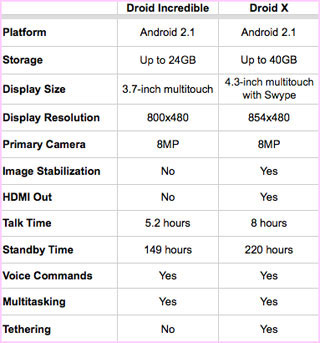
Straight up the Droid X has better hardware. Take a look at this chart. Also, the Engadget review on the Droid X is decent, but they spend too much time comparing it to the EVO 4G. I can only speculate based on reviews and and my research, but here are my further comments:
There’s something about HTC that pisses me off. Probably SenseUI with that huge fucking clock on the homescreen (you can probably turn that off though) and the moronicly shaped waste of space software phone/menu buttons on the bottom. At the same time, I’ve never seen Motoblur, but from commercials, it looks very similar to the regular Google UI/ my Droid (only with different icons). Android skins piss me the hell off. From screenshots, I like Motoblur better, but I would much prefer for these hardware companies to stop fucking with UI customizations and leaving it the way Google intended it to. All of these customizations are fragmenting the Android OS and confusing people, letting morons like Apple and RIM’s Blackberry gain more users because their interfaces are consistent.
Because of the two UI themes, neither phone pleases me. SenseUI kills me, so I automatically put the Incredible out of my mind. At the same time, the Droid X is so damn huge, it doesn’t impress me either. So if I needed a new Android phone right now, I’m at a loss. I love the idea of the Nexus One because it’s sleek, but that’s out of the question because Verizon dropped it in favor of the two you’re pondering. Google also fucked up the launch of the Nexus One – they should have released it to carriers to sell and not created their own web store, plus releasing it to T Mobile was just dumb as shit and caused them to lose mad sales. Anyway…
The Incredible and Droid X are both very good pieces of hardware, but the Droid X is better. I hate the fact that the Droid X has such a huge screen. However, I did read that it was lighter than the Droid and if you said it fit into your pocket nicely and wasn’t too bad, go for it. The Droid X also has 7 homescreens, which is nice because in all honesty, there are so many cool widgets 3 screens simply isn’t enough.
Something to note: the Droid Incredible has the same sized screen as the original Droid. And on my Droid, the virtual keyboard is a pain in the ass and cramped (I’ve actually been using the physical keyboard). You eventually get used to it though. But with a bigger screen, the keyboard is more spread out and probably easier.
Droid X also records in HD and plays HD video, plus it has an HDMI out.
So my only concern is that you’d look like you’re hoding an iPad to your head when making calls, but if that’s not too bad for you, it doesn’t matter.
I’d lean Droid X, pending you taking a look at MotoBlur. Although it’s completely up to you.
Either way, if you go with an Android phone you’ll be happy. And they both have crazy cameras lots of storage and fast processors. No matter what you get, once you get it enjoy it and ignore the other one/ new phones that come out. Otherwise you’ll go crazy comparing things. I was SO pissed when the Nexus one was announced because I didn’t have the best phone anymore.
Good luck.
AndroidPhones
Android App of the Week: Barcode Scanner
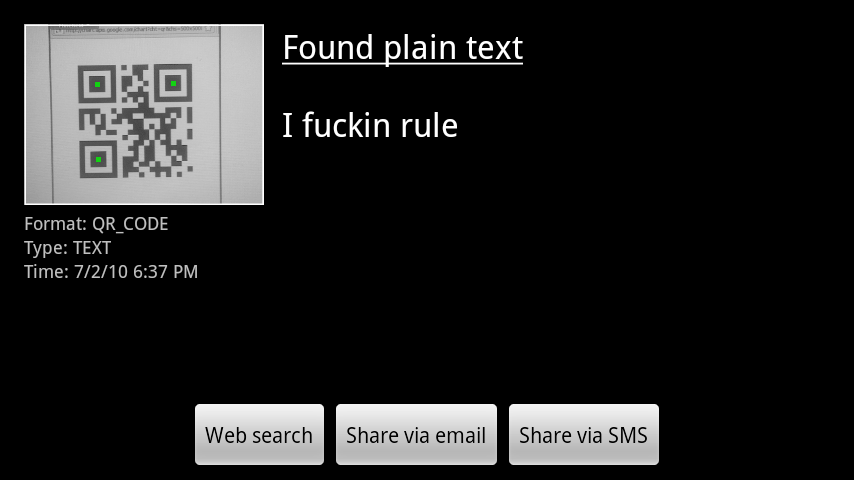 Barcode scanner. So useful. It does what it says, very nicely. It scans QR codes and regular barcodes. It’s packed with camera autofocus, web search, and can share scanned content via email or SMS. You can also share contacts, bookmarks and apps by generating respective barcodes and scanning it with another phone.
It just needs a few more features to be perfect:
- It needs to scan datamatrix codes
- You should be generate text and share that via barcode (You kind of can but it has to be on your clipboard, since you can share what’s on there)
Other than that, it’s a sweet app.
The only thing it needs to do is read datamatrix. Download it from the Market below (or click the image on your android device)!
AndroidApps
Twidroid Acquired by Tweeup, Changes name to Twidroyd
This is my favorite Android Twitter App. I like it better that Seesmic and the official Twitter client. Today, it was sold to TweetUp and development will be continued under the name Twidroyd. Why the name change?
You can blame Mr. George Lucas, who has the rights to the name droid from Star Wars. It’s absolutely ridiculous that the name had to change to avoid legal trouble. Jeez.
Anyway, grab a copy if you have an Android grab a copy of Twidroyd here. Also, it will be bundled on many phones as a result of this new deal. Enjoy.
AndroidApps
Tags
Android Annoyances Apple Apps Bad Engineering Baseball Cablevision Chats common sense Crime darwin awards drugs Environment Facebook FiOS Firefox Google Google Chrome Government Grammar Hicks Holiday Idi Internet Explorer Malware Metallica Money MTA net neutrality NYC Philosophy Phones Politics Pride Programs satire Science Song of the week Stupidity Torrents Verizon war Weather WordPress Yankees
Android App Of The Week: City Caller ID
July 15, 2010
Computer/ Tech Related
No Comments
Portfolioso
Yes, I know it’s Thursday and I should be doing this Wednesdays. I wrote this at work so I couldn’t get a screenshot off my phone, then I came home and fell asleep. Anyway…
Not only does it look up area codes, it also looks up the next three digits to narrow it down to a town. This may not be accurate for cell phones, but you get the general idea.
So what stinks about this app? The database isn’t stored on the SD card, so it uses about 3MB even though the app is 100kb or so. I contacted the developer and he said he was going to try to implement it, but got shut down. Still worth the download and install.
This is no longer available on the Android Market because some moron with a software patent threatened legal action against the developer. But I’m awesome and have the APK file for you, so grab it here. (You’ll have to put that on your SD card, go to settings–>applications and check unknown sources, then browse to the file using something like AndroZip or APK Installer and install. Little tricky for the newbies, leave me a comment if you’re confused.
AndroidApps